Loading…
Para sa Virtual Assistant
VA Client Manager
Keep every client and their task requests in one place. Clients get their own login to submit tasks and see progress.
Free
Paano gamitin
- Pindutin ang Gamitin ito
- Ilagay ang pangalan, logo at kulay mo
- I-share ang link sa team o customers mo
LibreLibre
Libre kapag naka-register. Isa kada account, hindi nag-e-expire.
Simulan nang libreSubukan muna ang demo- 5tao ang puwedeng gumamit
- 2papel: va / owner, client
- 2 minpara ma-set up
- Clients
- Tasks
- Reports
Ano ang laman
AI na buod
Binabasa ang records mo araw-araw at sinasabi kung ano ang maayos, ano ang dapat bantayan, at ano ang susunod na gagawin.
Clients
Every client in one place — contact details, rates, status and notes.
Tasks
Client task requests with priorities, deadlines and a To do → Completed board.
Reports
Standard reports and exports built from the portal's own data.
How to use
5 steps, from your first client to the EOD report.
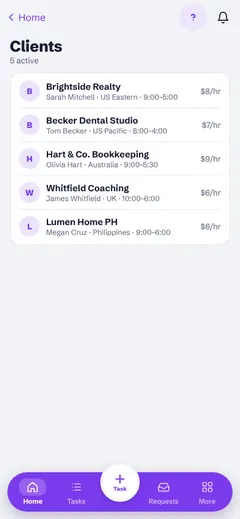
Add your clients
Name, email, time zone and their work hours.
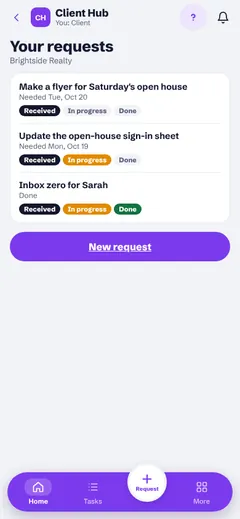
Invite them to their own login
They send a New request there and see the progress.
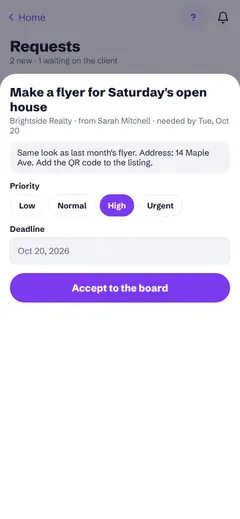
Accept requests
In Requests, set the priority and deadline, then Accept to the board. Not clear? Ask first.
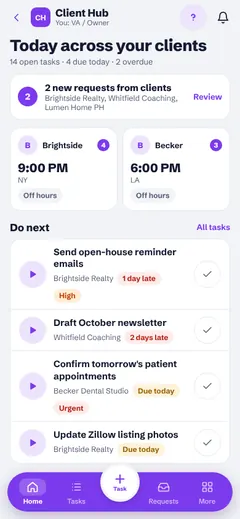
Work from “Do next”
Overdue first, then due today. Tap play to time it and the check when it's done.
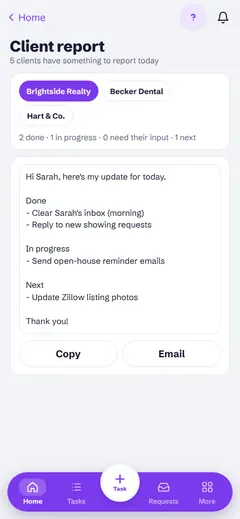
Send the EOD report
It's built from your tasks. Edit it, then Copy or Email.
Who does what
VA / Owner
Everything: clients, tasks, requests and reports.
Client
Sends requests and sees only their own Received, In progress and Done. Can't see your other clients or Reports.
First day
About 10 minutes- 2 min
Add your first client
Clients
- 1 min
Set their time zone and hours
Clients
- 3 min
Add 3 tasks you're working on
Tasks
- 1 min
Time one task
Home › play
- 3 min
Invite a client to their own login
Team
Questions
- Can a client see my other clients?
- No. Only their own requests.
- Is the EOD report sent automatically?
- No. You copy or email it after you check it.
- How do time zones work?
- You see their time now and whether they're at work or off hours.
- Do I need the AI?
- No. Polish is optional; reports work without it.
Try it in the demo
Opens at step 1 with sample data. No sign-up.
Dalhin ang spreadsheet mo
Naka-Excel o Google Sheets ka na? Ito ang mga column na naiintindihan ng app.
Clients
- Client
- Company
- Hourly Rate
- Status
Tasks
- Task
- Client
- Priority
- Deadline
- Status