Loading…
Para sa Small Business
Lending & Collections Tracker
For small lending businesses: money out (loans released), money in (payments collected), who has paid and who is behind, balances still to collect, and how much you've earned in interest.
Free
Paano gamitin
- Pindutin ang Gamitin ito
- Ilagay ang pangalan, logo at kulay mo
- I-share ang link sa team o customers mo
LibreLibre
Libre kapag naka-register. Isa kada account, hindi nag-e-expire.
Simulan nang libreSubukan muna ang demo- 5tao ang puwedeng gumamit
- 2papel: owner, collector
- 2 minpara ma-set up
- Loans
- Payments
- Reports
Ano ang laman
AI na buod
Binabasa ang records mo araw-araw at sinasabi kung ano ang maayos, ano ang dapat bantayan, at ano ang susunod na gagawin.
Loans
Every loan you release — borrower, amount, interest per month, term and how often they pay — with the total due, balance and who's behind worked out for you.
Payments
Every payment received — who paid, how much, when and how — so you can see who has paid and how much you've earned.
Reports
Standard reports and exports built from the portal's own data.
How to use
6 steps, from the first loan to collecting.
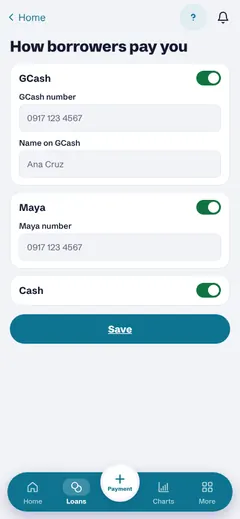
Set up how borrowers pay you
Add your GCash or Maya number (the gear on Loans).
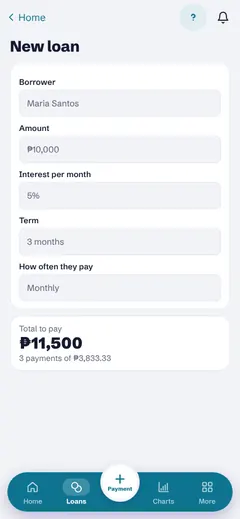
Add the loan
New loan: borrower, amount, interest and how often they pay. The app works out the schedule.
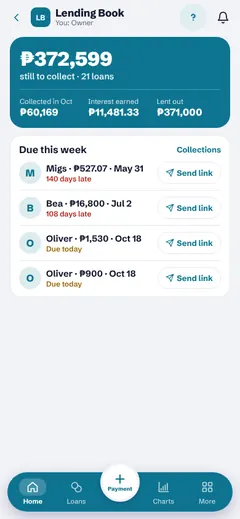
Send a pay link
In “Due this week”, tap Send link. You send it yourself by Messenger or text.
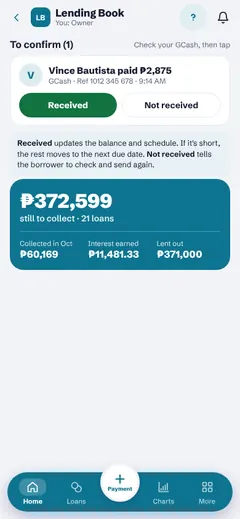
Tap Received
When the borrower taps “I've paid”, check your GCash, then Received. The balance updates by itself.
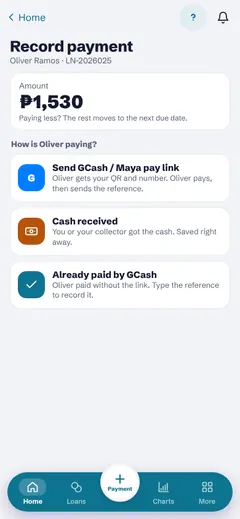
Cash? Record it right away
Payment, then Cash received. If it's short, the rest moves to the next due date.
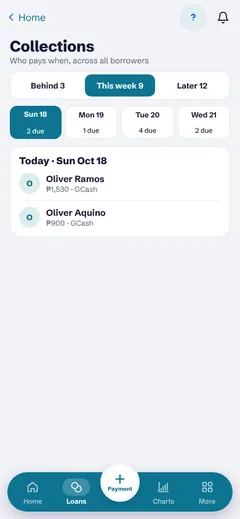
Check Collections
Who pays when, and who's behind.
Who does what
Owner
Everything, including Received for GCash or Maya, Reports and settings.
Collector
Collects: Due this week, Send link, Record payment and Collections. Can't confirm GCash or see Reports.
First day
About 10 minutes- 2 min
Add your GCash or Maya number
Loans › gear
- 3 min
Add your first loan
New loan
- 2 min
Open one pay link yourself
Send link
- 2 min
Add your other loans
New loan
- 1 min
Invite your collector
Team
Questions
- Does the money go through you?
- No. Borrowers pay your GCash or Maya directly. The app only keeps the record.
- Will the app text my borrowers?
- No. You or your collector send the link.
- What if they pay less?
- Record it anyway. The rest moves to the next due date.
- Who can see my borrowers?
- Only you and the collector you invite.
Try it in the demo
Opens at step 1 with sample data. No sign-up.
Dalhin ang spreadsheet mo
Naka-Excel o Google Sheets ka na? Ito ang mga column na naiintindihan ng app.
Loans
- Loan #
- Borrower
- Phone
- Released On
- Amount Lent
- Interest % / Month
- Term (Months)
- Pays
- Fully Due
Payments
- Date
- Loan #
- Borrower
- Amount Paid
- Paid Via
- Reference No.
- Received By