Loading…
Para sa Personal & Household
Hatian sa Streaming
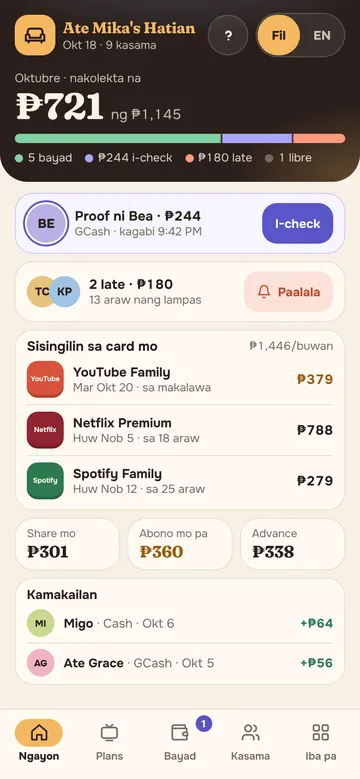
Split your family's Netflix, Spotify, YouTube and other plans the way each service allows, in Taglish or English: plans with their billing day and seats, shares (equal, custom, free or a discount), one due date a month for each member, each member's own link with your GCash, Maya, QR Ph or bank details and a proof upload, proofs to check, advance months, the late list and reminders you send yourself, and what you've fronted. Members pay you directly; the app only keeps the record, and never asks for a password.
Free
Paano gamitin
- Pindutin ang Gamitin ito
- Ilagay ang pangalan, logo at kulay mo
- I-share ang link sa team o customers mo
LibreLibre
Libre kapag naka-register. Isa kada account, hindi nag-e-expire.
Simulan nang libreSubukan muna ang demo- 5tao ang puwedeng gumamit
- 2papel: organizer, helper (katuwang)
- 2 minpara ma-set up
- Hatian sa Streaming
Ano ang laman
AI na buod
Binabasa ang records mo araw-araw at sinasabi kung ano ang maayos, ano ang dapat bantayan, at ano ang susunod na gagawin.
Hatian sa Streaming
Split your family's streaming plans the way each service allows: plans with their billing day and seats, shares (equal, custom, free or a discount), one due date a month for each member, each member's own pay link with proof upload, proofs to check, advance months, the late list with reminders you send yourself, and what you've fronted. Members pay you directly; no passwords, ever.
How to use
6 steps, from your first plan to your first reminder.
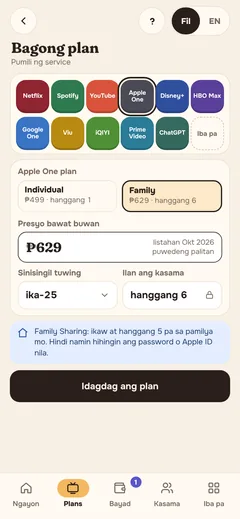
Add your plans
In Plans, Add a plan: pick a service and the price fills in. Change it if your bill is different.
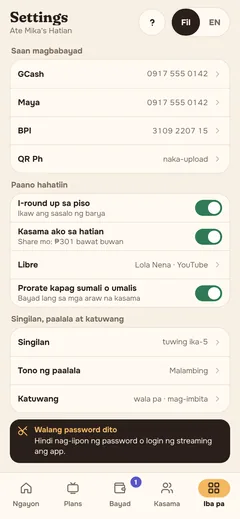
Add where to pay
In Settings › Where to pay: GCash, Maya, bank or QR Ph. Your members see this.
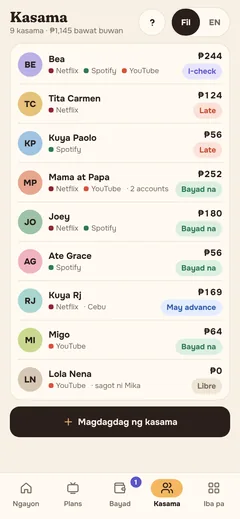
Add members and shares
In Members, add a name and their plans. Equal, custom, free or a discount.
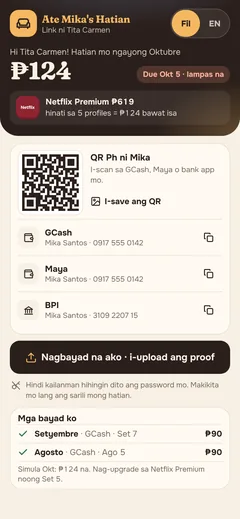
Send each person their link
That's where they see their share and upload a proof. No login, no password.
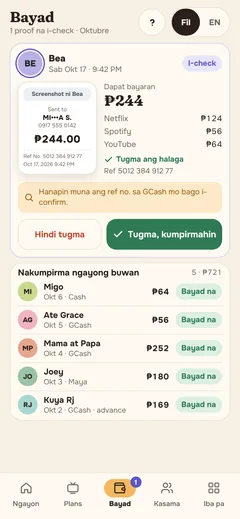
Check each proof
In Payments, find the ref no. in your own GCash first, then Matches or Doesn't match.
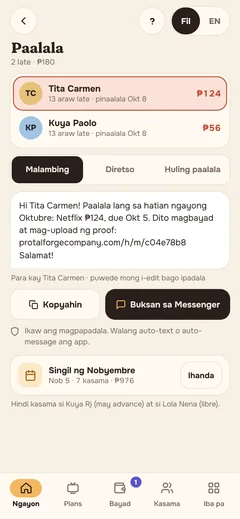
Remind whoever's late
In Reminders, copy it or open Messenger. You send it yourself.
Who does what
Organizer
Everything: plans, members, shares, payments, reminders and settings.
Helper (katuwang)
Checks proofs and sends reminders. Can't change plans, shares or settings.
First day
About 11 minutes- 2 min
Read the service rules
Plans › Service rules
- 2 min
Add your first plan
Plans › Add a plan
- 2 min
Add your GCash or Maya
Settings › Where to pay
- 3 min
Add your members
Members
- 2 min
Send everyone their link
Members › Copy link
Questions
- Does the money go through you?
- No. Members pay your GCash, Maya, bank or QR Ph directly. The app only keeps the record, and it never texts them: you send reminders yourself.
- Do you need our Netflix or Spotify password?
- Never. There's no place for a password in the app.
- Can someone outside the house join?
- Follow the service's rules. On Netflix, make them an Extra member with their own account.
- What if the price goes up?
- Change it on the plan. The new split starts next bill, and everyone sees it on their link.
Try it in the demo
Opens at step 1 with sample data. No sign-up.